
A few years ago, I was rushing to submit a final research paper just hours before the deadline. I had spent weeks gathering sources for the project, and my reference list was massive. I felt incredibly proud of the work that I had done.
But just a few minutes after I sent the draft to my supervisor, he replied with a quick email that made my heart drop. He pointed out that I had cited the exact same paper by a researcher named Smith three different times.
One entry had the full first names, another had only the initials, and the third had a slightly different publication year because of a typo.
It was an embarrassing mistake. That specific moment taught me a very valuable lesson about how important it is to clean up a reference list.
When we write long academic papers, we usually pull information from many different databases. You might download a citation from Google Scholar on a Monday, and then you might download the exact same paper from a university library database a week later.
Because the formatting can be slightly different, your reference software might treat them as two completely separate sources. Before you realise it, your bibliography is full of duplicates.
This mistake does not just look unprofessional. It also inflates your word count and causes confusion for anyone who is trying to find your sources.
So, how can we fix this issue? The good news is that spotting these repetitions is actually quite simple if you know the right techniques.
The Search and Find Method

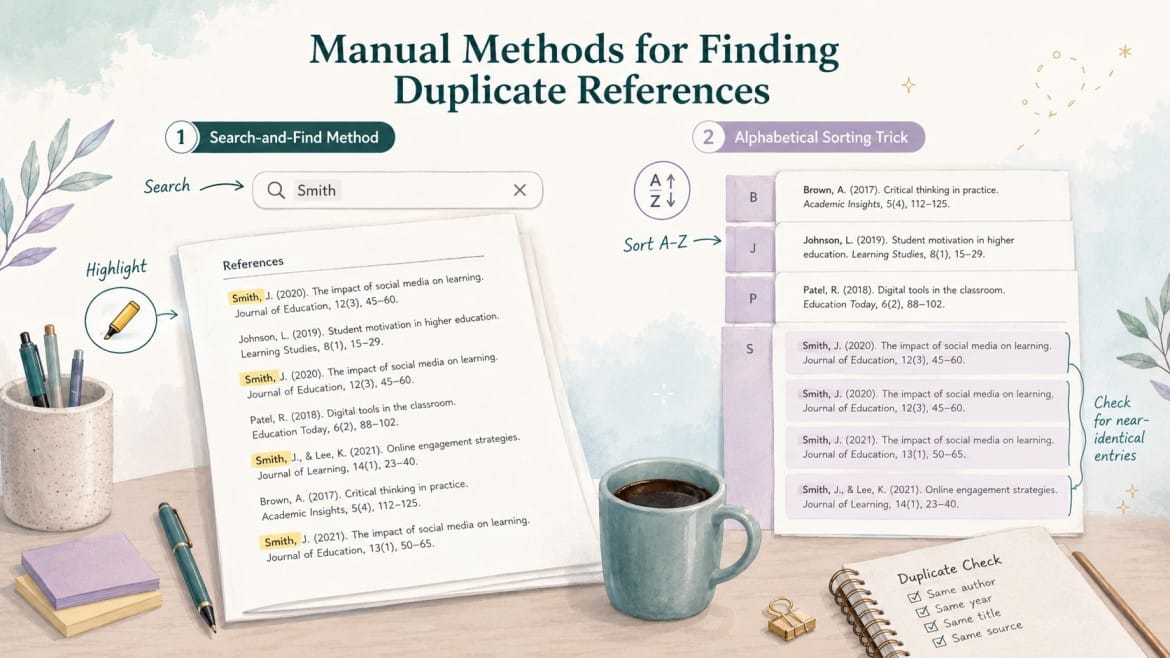
One of the most effective tricks that I rely on involves a very basic computer shortcut. Once you have compiled your final reference list, you should open your word processor.
Start by selecting the author’s name from one of your citations. Then, use the ‘Ctrl + Find’ function on your keyboard (or Command + F if you use a Mac). Paste the surname of the author into the search bar.
This simple action will highlight every single instance where that specific name appears in your entire document. You can then scroll through the highlighted sections to see if you have listed the exact same publication twice.
It is a manual process, but it is incredibly thorough for those papers that have a shorter list of citations.
The Alphabetical Sorting Trick
Another manual trick that I usually recommend to my students is sorting the reference list alphabetically before checking it.
When you highlight your entire list and arrange the entries from A to Z, any identical references will naturally sit right next to each other.
This arrangement makes it very easy for you to spot the duplicates with your own eyes. If you see two entries that look similar, you should carefully check the title of the article and the year of publication.
If they match, you simply delete the duplicate.
Using Reference Managers
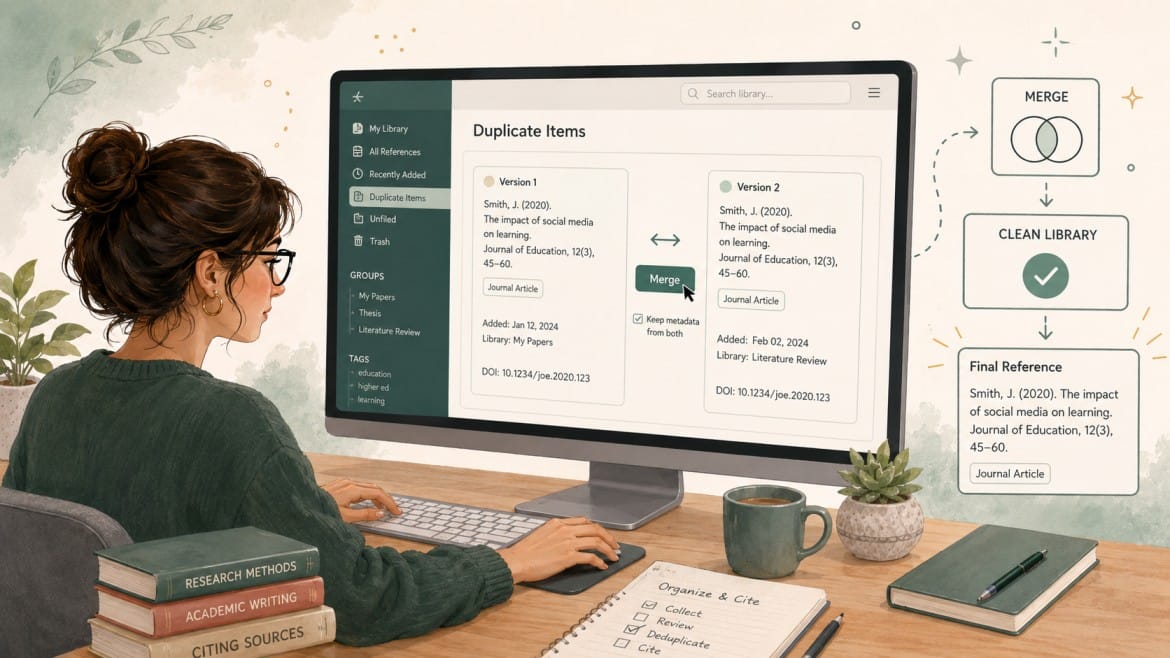
We also need to talk about the software tools that are designed to do this heavy lifting for us. If you use reference managers like Mendeley, Zotero, or EndNote, you are in luck.
These applications usually have a built-in feature that finds duplicates automatically. For example, if you look inside Zotero, there is a specific folder that is named ‘Duplicate Items’. When you click on that folder, the software will show you all the references that share similar data.
The application then allows you to merge those matching files into a single, clean citation. This feature saves us a massive amount of time, especially for systematic reviews that have hundreds of sources.
Cleaning up your references might seem like a boring chore at the end of a long writing process. However, it is a crucial step that you cannot afford to skip.
A clean and accurate reference list shows your examiners and your readers that you pay attention to the small details. Try these simple tricks on your next draft, and you will see how much easier the editing process becomes.

Godson Nana Adu Agyei has over eight years of experience in research consulting and study design. At NurcAcademy.com, Godson applies his extensive practical experience to help students, academics and professionals understand the intricacies of research methodologies. From developing powerful research questions to conducting complex data analysis, he provides high quality, practical tutorials that bridge academic theory and real-world practice.